


Forum Replies Created
-
AuthorPosts
-
in reply to: Upgrades on the Site #46334
Hi Everyone. Tonight I will be changing the text typing tool back to the one we had before. This will not change the image options, only the text formatting and smileys.
I noticed that the timeout is not working correctly. I will be trying some maintenance tonight as well to try and correct that. If you get weird error messages after 10pm mtn time please try back later.in reply to: trad bow for tall guys? #44448Great advice, Dave. I will just add that Steve Turay owns Northern Mist Longbows in northern Michigan. Great Northern is also a great bow built by Jerry Brumm.
in reply to: You know you might be wired different when… #35761How did you get pictures of our guest room without us knowing you were here?
 in reply to: Upgrades on the Site #35759
Reverting to the old posting system will only affect your ability to change font and font sizes, etc. By changing back to the old system you will get the auto spell checker and the old smileys back.
Changing back to the old system will NOT change the way photos are uploaded. You will still have the option of linking six pictures to your post.Haven’t heard anything on the timeout while typing PM’s. Have you noticed any difference? Longer time allowance?
in reply to: Dec/Jan issue #35750We’ll get another copy out to you this week.
in reply to: Upgrades on the Site #33946Steve Graf wrote: [quote=TBMADMIN]Hello All. Last night our site was upgraded to the latest version of MemberGate software. This included some new features in the forums. Most everything should be the same but it might take a little getting used to the new features…
- The timeout has been increased from 20 minutes to 1 hour! That should give you enough time to write your post without a bunch of saving and logging back in…
I just spent 20 minutes writing a PM. When I clicked on the send, it kicked me out to the log on screen… no warning about timeing out, no opportunity to copy the work to a clip board to avoid loss, etc… I used to be able to use the back arrow on my browser to get back to what I wrote and copy it. Not any more…
Can the time be increased for PM’s too? Is there a warning that can be added so work isn’t lost?Thanks.**everything I wrote in this is outside the end quote tag. But look how it displays.***Steve, that sounds very frustrating. I have tweaked a couple more settings, but I will also submit a support ticket to see if there is something wrong.Is your browser set to allow pop-ups from Tradbow.com? That should give you the warning but I know it didn’t always work in the forum. I don’t know why your back arrow didn’t work, I don’t think that is anything that changed with the upgrade. The quote problem is happening for me too and I think it has something to do with the formating on my original post (bullet points and left justification). I’ll look into it. Thanks for letting me know all this frustrating stuff is happening.The latest thing that drives me crazy; alll the space in the posts! If there aren’t too many “nay votes” I think we should go back to the old (simple) formating and emoticons. Any objections?in reply to: Getting started on making wooden arrows #31714
Building wood arrows is also covered in T.J.’s book The Traditional Bowhunter’s Handbook. We sell it on this site (under Products) or you can find it at Kustom King, 3Rivers, Lost Nation, etc.
in reply to: Dec/Jan issue #23396Yours went out with all the rest around the 15th. They are sent through bulk mail, so they don’t all get delivered on the same day. If you don’t have it by Monday, call Allie toll-free at 888-828-4882.
It’s my experience that once you take the time to ask about it, the dang thing shows up the next day. I hope that is the case with you.in reply to: Upgrades on the Site #20168Dave, I haven’t noticed any change in the font size with the recent upgrade. I was able to find where I can set the font size for the forum. I changed it, but I don’t see much difference. I can change the size of my browser window, which helps with the small type. On a Mac I hold Command and hit the plus key to make it larger, minus key to make it smaller. Not sure what key combo that would be on a PC. Any help?
Dang, we do need some better emoticons. Dave, where did you get yours?
I couldn’t find anything to change the spell checker to check while you type, so use the little ABC/Check mark after you are done typing your post.
I haven’t noticed any more problems with the post notifications going away before I read the post. If anyone is still having trouble with that, please tell me which browser/version you are using so I can test it further.
in reply to: Dec/Jan issue #19671Stumpkiller wrote: Mine still hasn’t arrived! It’s not fair.
Charlie, I guess your mailman isn’t finished with it yet. They all get mailed on the same day, but bulk mail doesn’t always get delivered on the same day. If you don’t have it by Nov. 1 please call Allie toll-free at 888-828-4882.in reply to: Upgrades on the Site #16159
Thanks for your input Steve. I got the same general feeling about the threads being marked/unmarked but I thought it was just me. Ha ha. I’ll keep an eye on it, but of course when I look today there was only one new thread. I typically look for the title of the thread to be bold, that’s how I know which ones I haven’t read.
I’ll also look to see if the spell checker can be set to check as you type. When you click the ABC/check button it underlines the words and when you click the word it gives you suggestions for the correct word. I don’t remember if our other system did that. Someone else asked for more emoticons and I’ll see if I can add to those.in reply to: Upgrades on the Site #13931
Yep. Our daughter, Kerri’s son born in August. Now I’m a Web Grandmother! I sure don’t feel as old as my grandmother was! Ha ha.
in reply to: Upgrades on the Site #13487vintage archer wrote:
Robin, What exactly is the proceedure then for linking pictures.I know you have a post on this subject using photo bucket. ?
Hi Joe,
You have to promise to email me from time to time since I won’t get to help you as much.
When you are typing a post/reply, below the text box there are a couple of options. Below “Subscribe to Thread” you will see “Attach File”. When you choose a file you can browse your computer and upload it to you post. Although, now that I think about it I’m not sure if we can add one in the middle of a post…let’s try it.
Here is a picture of me with my grandson, Jameson. T.J. looks worried that I won’t give him back!
Hmmm. It didn’t seem to add it in with the text, so I’m guessing it will be at the bottom or top. But after I selected one picture, it gave me the option to attach another one. It’s my understanding that you are allowed six attachments. I suppose if you want to scatter the images within your text you have to keep doing it the old fashioned way…with Photobucket. That post is still at the top of the Campfire Forum.
Take care,
PS. I had to edit the post because it had a lot of blank spaces. What’s up with that? I’m sure I’ll have to tweak some of the settings, like the colors I chose to designate question, answer and comment. Please bear with me til I figure out how this is going to turn out. 🙂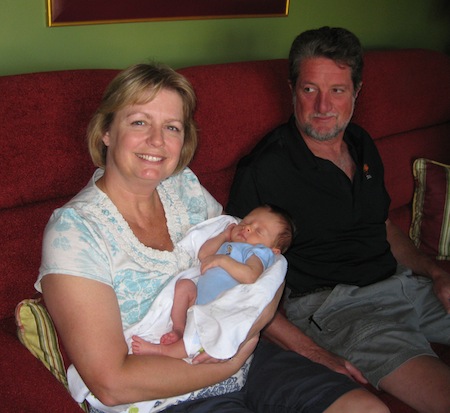 in reply to: Great Plains vs Predator #8793
Blacky Schwarz has reviewed bows by both bowyers. Below are the issues that each review was published in. If you don’t have these back issues, they are available for $5 each, but you might try Blacky’s site, http://www.bowreports.com, first to see if he has posted the reviews there. I think either one would be a fine bow.:D
Apr/May 06 Custom Classic T/D Recurve from Predator Custom Bows
Oct/Nov 07 Great Plains SR Swift TD Recurve
in reply to: A trophy "dear". My first! #62666Congratulations to everyone involved! We became grandparents in August and it is the best club ever! 😀
-
AuthorPosts
